

Office lighting: technical guide and regulations 2026 | Factorled

David Torres
2026-09-21 15:05:24
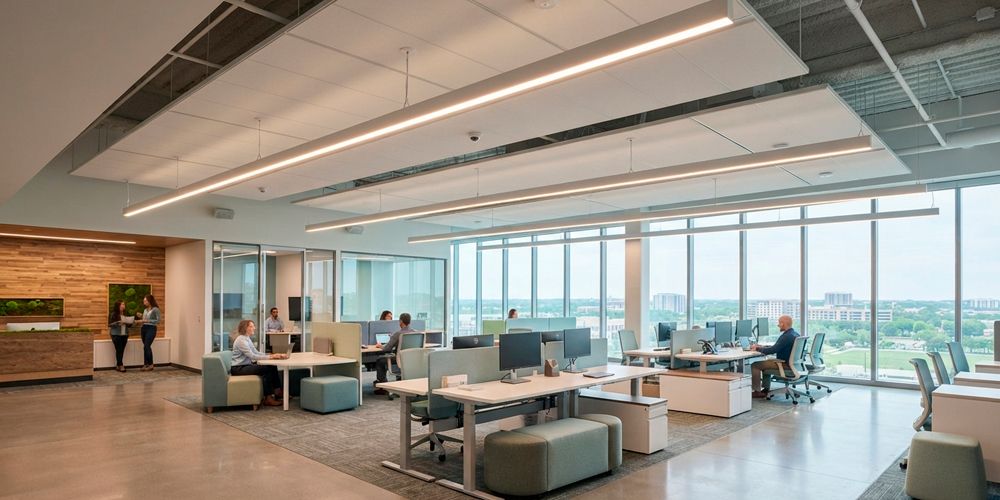
The office is the space where workers spend more hours under artificial light than in any other environment. It is also the space where lighting quality has the greatest proven impact on productivity, visual health, wellbeing and absenteeism. Correct office lighting does more than comply with regulations: it improves business results, cuts energy consumption by up to 70% and pays for itself in under 18 months. This guide brings together everything you need to design, specify and install an office lighting project that works on every level: technical, human and economic.
1. Why office lighting matters more than it seems
Knowledge workers spend between 1,800 and 2,200 hours a year under artificial light in the office. Over that time, light quality has a cumulative impact on their cognitive capacity, visual health and mood that most companies completely ignore.
The hidden cost of poor office lighting
A company with 50 employees at an average cost of €35,000/year spends €1,750,000 a year on payroll.
A 10% increase in productivity equals €175,000 of additional annual output.
The investment in correct lighting for 1,000 m² of office: 35.000–45.000€.
ROI calculated on productivity alone: under 3 months. Not counting the energy savings.
2. Technical parameters: what the standard requires in each zone
The standard EN 12464-1:2021 sets the minimum lighting values for each work zone in offices. Failing to comply has legal consequences. This is the complete reference for a standard office:
| Zone | Lux | Colour temp. | CRI | UGR | Key criterion |
|---|---|---|---|---|---|
| Open plan / work area | 500 | 4,000K | Ra≥80 | <19 | Mandatory under EN 12464-1. The zone with the greatest impact on productivity. |
| Private office | 500 | 3,000–4,000K | Ra≥80 | <19 | Same standard as open plan. The temperature can be slightly warmer. |
| Meeting room | 500 | 4,000K | Ra≥80 | <19 | With a screen or projector: avoid reflections. Tunable White is ideal. |
| Video-conference room | 500–750 | 4,000K | Ra≥90 | <19 | Ra≥90 so faces look natural on camera. Facial lighting is key. |
| Reception / company lobby | 200–300 | 3,000K | Ra≥80 | <22 | Welcoming atmosphere. A warmer temperature makes a better first impression. |
| Training room / classroom | 500 | 4,000K | Ra≥80 | <19 | Zone of prolonged concentration. UGR<19 essential. |
| Break room / cafeteria | 200 | 3,000K | Ra≥80 | <22 | Zone for switching off. Warmer light aids cognitive recovery. |
| Archive / document room | 300 | 4,000K | Ra≥80 | <25 | Lower requirement. Occupancy sensor highly recommended: intermittent use. |
| Server room / data centre | 500 | 4,000K | Ra≥80 | <19 | Precision technical work. Cool temperature to maintain alertness. |
| Toilets and changing rooms | 200 | 4,000K | Ra≥80 | <25 | Occupancy sensor mandatory under many municipal regulations. |
| Corridors and circulation areas | 100 | 4,000K | Ra≥40 | <28 | Minimum level. Occupancy sensor: maximum energy savings here. |
| Stairs | 150 | 4,000K | Ra≥40 | <25 | Clear signage. Emergency lighting mandatory. |
← Swipe the table horizontally to see all columns →
The colour temperature scale applied to the office
Colour temperature is not an aesthetic matter: it determines the worker's state of alertness. These are the three references that structure any office project:
Visual colour temperature scale applied to the zones of an office
4,000K for everything that is work; 3,000K for everything that is rest or welcome. That single decision resolves 80% of office projects.
If the budget allows Tunable White, the optimal sequence is 5,000K first thing in the morning (activation), 4,000K at midday (sustained performance) and 3,000K at the end of the day (gentle descent towards the night-time circadian cycle).
N = (E × S) / (Φ × η × Fm)
N = no. of luminaires · E = target lux · S = area (m²)
Φ = flux per luminaire (lm) · η = room utilisation factor · Fm = maintenance factor
Example: 200 m² open plan at 500 lux with 4,000 lm panels, η = 0.70 and Fm = 0.80:
N = (500 × 200) / (4,000 × 0.70 × 0.80) = 100,000 / 2,240 ≈ 45 panels
This calculation is for sizing and budgeting. It does not replace the DIALux simulation, which is the only way to verify the real UGR in the viewing direction of each workstation.
3. Design by office type
Not all offices are the same. The lighting solution must adapt to the working model and the architectural concept of each space:
| Type | Description of the space | Lighting solution | Design criterion |
|---|---|---|---|
| Traditional open plan | Rows of long desks, uniform light, no spatial hierarchy. | 60×60 UGR<19 LED panels in a modular ceiling. Regular grid. Occupancy sensor per zone. | Maximum energy efficiency. The challenge: uniformity without feeling monotonous. |
| Modern open plan (activity-based) | Differentiated zones: focus, collaboration, social. High flexibility. | Suspended TW linear LED luminaires + downlights for focus zones + wall lights for lounge zones. | The lighting system must follow the activity. Tunable White highly recommended. |
| Coworking / flex space | High user turnover, different companies, variable hours. | UGR<19 panels with an individual occupancy sensor per zone. App control. | Maximum energy savings with variable occupancy. Zigbee or DALI for management by area. |
| Private offices on the perimeter | Offices with exterior windows. Daylight varies over the course of the day. | Dimmable downlight + daylight sensor. Integration with smart blinds. | Daylight harvesting: the luminaire complements daylight without duplicating it. |
| Open floor with daylight in the core | Building with a central atrium or light wells. Daylight reaches the interior. | Control system with daylight sensor. Automatic reduction according to solar contribution. | The savings potential is the greatest of all types. Up to 40% reduction. |
| Boutique office / luxury headquarters | High investment in design, premium materials, employee experience. | Suspended TW Ra≥90 linear LEDs + LED strips in cornices and decorative elements + art lighting. | Lighting design is part of the brand identity. Ra≥90 and Tunable White essential. |
← Swipe the table horizontally to see all columns →
The activity-based (ABW) office design divides the space into functional zones: focus (individual concentration), collaboration (teamwork), social (rest and informal interaction) and phone (private calls).
Each zone needs a different solution: the focus zone requires 500 lux, UGR<19 and neutral light; the social zone needs 200 lux, warm light and a relaxed atmosphere.
The control system must manage these differences automatically. Tunable White with DALI or Zigbee is the most suitable technical solution for this type of space.
4. Zone-by-zone design: the 5 key zones of an office
- Lux on the working plane
- 500 lux at 0.75 m above the floor. It is the legal minimum and the threshold of maximum productivity.
- Maximum UGR
- UGR < 19. Mandatory at workstations with screens. Verify by simulation for the real dimensions of the space.
- Temperature
- 4,000K as standard. With Tunable White: 5,000K first thing, transitioning to 4,000K by midday.
- CRI
- Ra ≥ 80 minimum. Ra ≥ 90 for design, communication or management teams.
- Luminaire
- 60×60 UGR<19 LED panel in a modular ceiling. Suspended linear luminaire for spaces without a suspended ceiling.
- Control
- Daylight sensor in façade zones. Occupancy sensor per zone. Astronomical timer or DALI.
- Recommended lux
- 500 lux on the table. With a projector or large screen: reduce to 30–50% to avoid reflections.
- Essential control
- Programmed scenes: "presentation" (200 lux + screen), "meeting" (500 lux), "video conference" (750 lux facial).
- Video conference
- In frequently used VC rooms: frontal Ra≥90 light, 750 lux, at face height. Not only from above.
- Temperature
- 4,000K for working meetings. With TW: option of 3,000K for networking meetings or closing deals.
- UGR
- UGR < 19. Reflections of the luminaire on participants' screens are the biggest problem.
- Recommendation
- Always install dimming (dimmer or DALI). The meeting room is the zone with the most variable use.
- Lighting objective
- Real cognitive disconnection. 200 lux and 3,000K create an atmosphere different from the work area that aids recovery.
- Temperature
- 3,000K maximum. Warm light encourages relaxation and informal conversation between employees.
- No UGR<19
- This is the zone where UGR<19 is not mandatory. Slight ambient glare is compatible with the use.
- Complement
- Wall lights or table lamps to create more intimate scales within the cafeteria. Humanise the space.
- Control
- Occupancy sensor (it can be empty for hours). Scene differentiated from the rest of the office.
- Real impact
- Companies with a correctly lit break area report higher employee satisfaction with the working environment.
- The key difference
- The participant must look good on camera, not just be comfortable in the room. These are two sometimes contradictory requirements.
- Facial light
- Frontal light or slightly above the line of sight. Ra≥90. 750 lux at face height (not on the table).
- Eliminate shadows
- No single downlight: it creates hard shadows under the eyes and nose that are unflattering on camera.
- Temperature
- 4,000K. Neutral light reproduces skin tone more faithfully than warm or cool light.
- Control reflections
- The screen must have no luminaire reflected on its surface. Calculate the reflection angles in the design.
- Extra recommendation
- Acoustic panels absorb the echo that degrades sound quality. Lighting and acoustics are planned together.
- Minimum level
- 100 lux. The objective is safety and orientation, not work. Above this level, the consumption is not justified.
- Sensor required
- The corridor occupancy sensor is the saving measure with the best cost/benefit ratio in the whole office.
- Emergency
- Emergency lighting is mandatory in every corridor that forms part of an escape route (Spanish Building Code CTE DB-SUA-4).
- Temperature
- 4,000K for consistency with the rest of the floor. The corridor should not feel like a different environment.
- Real savings
- A 40 m corridor with 10 18W downlights on 10 h/day consumes 657 kWh/year. With a sensor (10% standby, 30% actual occupancy): 98 kWh/year. −85%.
- Minimum control
- Microwave sensor (not PIR) to avoid dead zones and detect movement through glass doors.
5. The science of productivity: what the studies say
These are the most relevant studies that technically justify every lighting decision in an office:
| Parameter | Source of the study | Negative impact (non-compliant) | Benefit of meeting the standard |
|---|---|---|---|
| Lighting level (lux) | Cornell University (2018) and CIBSE Lighting Guide LG7 (2015) | Less than 300 lux on the working plane reduces reading speed by 25% and increases transcription errors by 40%. | 500 lux is the threshold at which productivity is maximised for screen and document work. More than 750 lux does not improve it, but can cause fatigue. |
| Colour temperature (Kelvin) | Kruithof (1940, revised) and Universität Innsbruck (2017) | 2,700K light at an office workstation reduces cognitive processing speed and increases drowsiness. | 4,000K is the optimal standard for maintaining alertness and concentration in complex cognitive tasks over 8+ hours. |
| UGR (glare) | EN 12464-1 and the Swedish Work Environment Authority | A UGR above 22 at workstations with screens causes cumulative eye strain and increases errors by 15–20% over long days. | UGR<19 significantly reduces eye strain. For graphic design or visually demanding work, UGR<16 is advisable. |
| LED flicker | IEEE Standard 1789-2015 and University of California San Diego | Flicker above 10% (Flicker Percent) is perceptible subconsciously and causes headaches in 35% of people exposed for more than 2 hours. | Choose luminaires with Flicker Percent <5% and Flicker Index <0.05. Quality drivers guarantee these values in the data sheet. |
| Daylight vs artificial light | Northwestern University, Journal of Clinical Sleep Medicine (2014) | Employees who work without access to daylight sleep on average 46 minutes less per night than those with windows nearby. | Lighting design must complement daylight, not replace it. Systems with daylight harvesting are the technical solution. |
| Colour rendering index | WELL Building Standard and the Illuminating Engineering Society | A low CRI (Ra<70) creates the perception of a neglected environment and increases visual stress without the worker being aware of it. | Ra≥80 minimum. Ra≥90 in zones where colour matters: design, creative production and meeting rooms with large screens. |
← Swipe the table horizontally to see all columns →
LED flicker occurs when the driver has poor AC/DC conversion and the luminous flux varies at mains frequency (50/100 Hz) or higher frequencies.
- Above 10% variation (Flicker Percent), the visual system detects it unconsciously.
- Result: eye strain, headaches and reduced concentration after 2 or more hours of exposure.
- Cheap drivers with no flicker specification are the source of many complaints of the type "I don't know what it is about this light, but it tires me out".
Always verify Flicker Percent <5% and Flicker Index <0.05 in the driver's data sheet. If the manufacturer does not declare these values, it is because they have not measured them.
6. Control systems: from manual switching to the smart building
The control system is the difference between a correct installation and an excellent one. This table compares all the options with their BACS class and savings potential:
BACS classes according to EN 15232 (EN ISO 52120) applied to office lighting
| Control system | BACS class | Savings | Key observation |
|---|---|---|---|
| Manual on/off | D | 0% | The absolute minimum. No savings possible. Only justified in refurbishments with a very tight budget. |
| Occupancy sensor per zone | B | 25–35% | The measure with the best cost/savings ratio in offices. Automatic switch-off in unoccupied zones. |
| Time-based control | C–B | 15–25% | Switch-off outside working hours. Reduction to 50% at times of lower occupancy. |
| Daylight sensor | B | 20–35% | The luminaire automatically reduces its output when there is enough daylight. Major impact on south-facing façades. |
| Occupancy + daylight combination | B | 40–55% | The most efficient and economical combination for offices with windows. Recommended standard. |
| DALI with centralised management | A | 50–65% | Consumption reports per zone, fault detection, HVAC integration. For buildings >500 m². |
| Tunable White + astronomical timer | B | 20–30% | Savings from dimming at times of lower activity + circadian benefit for employees. |
| DALI + TW + integrated sensors | A | 55–70% | The complete system: maximum energy savings and maximum wellbeing. ROI in 24–36 months. |
← Swipe the table horizontally to see all columns →
For medium-sized offices (200–1,000 m²), the optimal combination in terms of cost/performance is: Tunable White UGR<19 LED panels + Zigbee occupancy sensors per zone + daylight sensor on the façade + astronomical timer.
This combination reaches BACS class B, provides savings of 40–55% compared with fixed lighting and has an installation cost only 20–30% higher than an LED installation without control.
For buildings over 500 m²: consider DALI to obtain BACS class A and access energy-efficiency grants.
7. The 8 mistakes that wreck an office's productivity
These are the lighting mistakes that generate complaints, sick leave and unnecessary consumption in offices across Europe:
| Mistake | Situation | Real consequence | Correct solution |
|---|---|---|---|
| LED panels without UGR<19 in open plan | Standard Ra=75 panels without UGR<19 certification. | Legal non-compliance with EN 12464-1. Eye strain, headaches, reduced productivity. Possible health and safety penalty. | UGR<19 is mandatory in work zones with screens. Require certification in the data sheet, not just a declaration. |
| 6,500K colour temperature throughout the office | Installing cool white LED in the belief that it gives "more light". | Overstimulation of the nervous system. Increased irritability and reduced perceived wellbeing on long shifts. | 4,000K is the standard for offices. With Tunable White: 5,000K first thing, 4,000K at midday, 3,000K in the evening. |
| No occupancy sensor in corridors and archives | Lighting at full output 24/7 in intermittently used zones. | Up to 40% of lighting consumption wasted in empty zones. Hundreds of euros a month in a large office. | Occupancy sensor in corridors, toilets, archive and server room. Sensor ROI: always under 3 months. |
| The whole office at the same lux level | Uniform lighting with no differentiation between work zones and break zones. | Break areas at 500 lux do not allow cognitive disconnection. The employee returns to the desk without having recovered. | 200 lux and 3,000K in the cafeteria and break room. The difference in atmosphere enables real recovery. |
| No integration with daylight | The luminaire always delivers 500 lux even when sunlight comes in through the window. | The worker next to the window receives 1,000–1,500 lux in total: overexposure that causes fatigue. And the company pays for unnecessary energy. | Daylight sensor + automatic dimming. The luminaire contributes only what is missing to reach the 500 lux target. |
| Video-conference room with a single overhead light | A single downlight in the ceiling of the video-conference room. | The shadow under the eyes and nose creates an unprofessional image for remote participants. | Frontal and lateral Ra≥90 light at 750 lux. The participant must look good on screen: it is a work zone with a functional aesthetic requirement. |
| Ignoring flicker in precision work | Cheap drivers with no flicker specification in design or CAD rooms. | Flicker invisible to the conscious eye is detected by the subconscious visual system, causing fatigue and headaches. | For graphic design, architecture and visual precision: Flicker Percent <5% and Flicker Index <0.05. Check the data sheet. |
| Control system too complex for the user | Highly complex DALI or KNX system with no user training and no simple interface. | The user does not use it, leaves everything at 100% and the control system is rendered useless. Wasted investment. | A 30-minute user training session is mandatory for any smart system. A simple interface is as important as the technology. |
← Swipe the table horizontally to see all columns →
- Workstations with screens without UGR<19: non-compliance with EN 12464-1 and Spanish Royal Decree 486/1997 on workplaces. Minimum fine of €2,046.
- Lux levels below the minimum on the working plane: occupational health and safety offence, aggravated if sick leave results from eye strain.
- Escape routes without emergency lighting: non-compliance with CTE DB-SUA-4. It is the point that generates the most inspection reports in office refurbishments.
None of the three is expensive to resolve at the design stage. All three are expensive to resolve once the office is installed.
8. Certifications that require quality lighting
Office lighting is at the heart of the main international standards for healthy and sustainable buildings. If your client is seeking any of these certifications, correct lighting is essential:
🏢 60×60 UGR<19 Tunable White LED panel: the piece that solves 80% of an office
In most office projects, the 60×60 panel for modular ceilings is the luminaire that defines the result: it covers the open plan, the private offices, the meeting rooms and the training rooms. If that piece is well chosen, the project meets the standard; if it is not, no control or scene can fix it afterwards.
The Tunable White 2,700K–6,500K version with DALI-2 driver adds the layer that separates a correct office from a high-performance one: variable temperature over the day, integration into the building's control bus and compatibility with the dynamic lighting requirements of WELL certification.
Real case: an office of 1,000 m² and 100 workstations renovated with TW UGR<19 panels, occupancy sensors per zone and daylight harvesting on the façade — €38,000 investment, €28,000 annual savings and a 16-month ROI, with a consumption report per zone included.
9. How the project is executed, step by step
An office lighting project does not start by choosing luminaires: it starts by measuring. This is the complete process we apply with installers and designers:
- Survey the current stateMeasure actual levels in each zone with a lux meter and take an inventory of light points, installed power and actual hours of use. Without baseline measurements there is no justification for improvement and no access to grants.
- Zone the spaceDefine the functional zones (open plan, private offices, meetings, video conference, break, circulation) and assign each its lux, UGR, CRI and colour temperature values according to EN 12464-1.
- Calculate the photometry with DIALuxSimulation with real dimensions, ceiling, wall and floor reflectances and the actual position of the workstations. UGR must be verified in the real viewing direction, not the theoretical one.
- Select a certified luminaireRequire UGR<19 certification, declared CRI, Flicker Percent <5% and an LM-79 photometric report. The catalogue's marketing claim is no substitute for the laboratory test.
- Define the control systemOccupancy sensor per zone, daylight sensor on the façade and, in buildings over 500 m², a DALI-2 bus with centralised management to reach BACS class A.
- Install and addressMounting according to the calculated grid, wiring of the control bus, addressing of the DALI drivers and grouping of luminaires into control zones. Poorly documented addressing is the most expensive problem to resolve afterwards.
- Programme scenes and calibrate sensorsConfigure the meeting, presentation and video-conference scenes, adjust the setpoint of the daylight sensors and the hold times of the occupancy sensors according to the actual use of each zone.
- Verify, document and train the userFinal measurement with a lux meter, record of levels per zone, handover of the technical dossier and brief user training. Without that half hour of training, the control system ends up disabled.
10. ROI by office size: the numbers that close the project
This table shows typical investment, savings and ROI values for different office sizes:
| Type / size | Investment | Savings/year | ROI | Notes |
|---|---|---|---|---|
| Small office (100 m² / 10 people) | 4.000€ | €2,800/year | 17 months | UGR<19 panels + sensor in corridors and toilets. Energy savings and regulations met. |
| Medium office (300 m² / 30 people) | 12.000€ | €8,500/year | 17 months | TW UGR<19 panels + sensors + astronomical timer. With corporate tax deduction: ~10 months. |
| Large office (1,000 m² / 100 people) | 38.000€ | €28,000/year | 16 months | DALI + TW + sensors system. Consumption report per zone included. |
| Office building (3,000 m² / 300 people) | 110.000€ | €84,000/year | 16 months | Complete class A DALI system. With PERTE/PRTR: net investment ~€66,000 and ROI of ~9 months. |
| Coworking 500 m² (high turnover) | 20.000€ | €15,000/year | 16 months | Zigbee + sensors per zone. App control per rented space. |
← Swipe the table horizontally to see all columns →
Route 1 — Regulations: non-compliance with EN 12464-1 has legal consequences (minimum fine of €2,046 and liability in workplace accidents).
Route 2 — Economics: ROI of 16–17 months on energy savings alone. With PERTE/PRTR grants: 9–10 months.
Route 3 — People: +15% productivity among knowledge workers, −25% errors and −20% absenteeism due to eye strain. In euros, several orders of magnitude above the investment.
There is not a single reason not to do the project. There are three reasons to do it now.
Conclusion: a correctly lit office is a competitive advantage
Companies that look after their employees' working environment retain talent better, have less absenteeism and achieve higher productivity. Lighting is one of the environmental factors with the strongest scientific evidence and the lowest investment relative to its impact.
A well-designed office lighting project meets five objectives at once: legality, productivity, wellbeing, energy efficiency and brand identity. No other measure in the building achieves all five at the same time with a 16-month ROI.
Factorled products for offices
- 60×60 UGR<19 LED panel36W and 40W. Standard for suspended ceilings. Available with DALI-2 driver.
- 60×60 Tunable White UGR<19 LED panel2,700K–6,500K. For HCL and activity-based working.
- Suspended UGR<19 linear LED luminaireFor spaces with a continuous ceiling. Available in a direct/indirect version.
- Suspended Tunable White linear luminaireFor modern open plan and luxury headquarters. Ra≥90.
- Dimmable Ra≥90 LED downlightFor private offices, reception and break areas.
- Zigbee and DALI occupancy sensorsFor corridors, archives, toilets and intermittently used zones.
- Zigbee and DALI daylight sensorsFor daylight harvesting in façade zones.
- DALI-2 controllersFor centralised management systems of BACS class A and B.
Design your office lighting project with Factorled
At Factorled we work with installers, interior designers and project designers on office lighting projects of every size.
We help you with the selection of UGR<19 luminaires, the photometric calculation with DIALux, the DALI or Zigbee control system and the documentation for grants and WELL and LEED certifications.
Complete range for offices: UGR<19 LED panels, suspended Tunable White linears, dimmable downlights, occupancy and daylight sensors, and DALI-2 drivers.
Article written by the Factorled technical team · factorled.com